





Tailwind has been around for years and was the default tool for Pinterest scheduling.
And it still does that well.
But Pinterest today is not just about scheduling. Most of the work now is in creating pins and figuring out what works.
In this Tailwind app review, I’ll break down where Tailwind still works and where it starts to fall short.
- Best for: Scheduling and staying consistent on Pinterest
- Biggest strength: Reliable queue system and SmartSchedule
- What’s missing: Strong pin creation and deeper automation
- Pricing issue: Credit system limits actual output (around 50 AI pins on starter plan)
- Workflow gap: Still need tools like Canva for design
What Tailwind Does Well
Key strengths of Tailwind for Pinterest scheduling, keyword research, and consistent content publishing.
1. Scheduling and Consistency
The biggest strength of Tailwind is still scheduling.
You can batch your pins, plan weeks or even months in advance, and let everything run without needing to log in daily. The queue system is simple, predictable, and works reliably.

For anyone trying to stay consistent on Pinterest, this alone solves a real problem.
Once your queue is set, you don’t have to think about posting again.
2. SmartSchedule (Best Time Suggestions)
Tailwind includes SmartSchedule, which suggests the best times to post based on your account activity.
Instead of guessing when your audience is active, the tool handles it for you.
It’s not something that dramatically changes performance, but it removes one more decision from your workflow, which adds up over time.
3. Bulk Upload and Batch Workflow
Another strong point is bulk scheduling.
You can upload multiple pins at once, assign boards, and queue everything quickly. This works especially well if you create content in batches.
Instead of posting one by one, you can plan an entire week or month in a single session.
4. Communities (Still Useful in Some Cases)

Tailwind Communities were a big feature earlier.
They allowed users to share and distribute each other’s pins to increase reach.
They are not as impactful as they used to be, but for some niches, they can still help with initial traction.
5. Keyword Research and Hashtag Suggestions
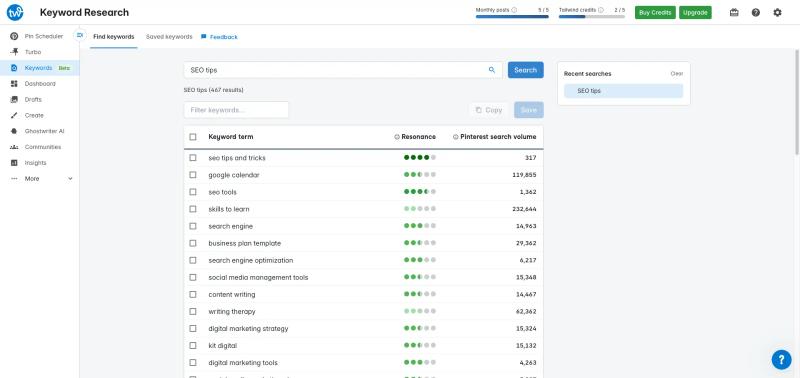
One feature Tailwind does well, and something not many tools offer, is built-in keyword and hashtag suggestions.
When you’re writing pin titles and descriptions, it helps you find relevant keywords so you’re not starting from scratch. This is especially useful if you’re unsure what people are actually searching for on Pinterest.
It’s not a full SEO tool, but it gives you a quick direction and saves time.
Even newer tools like GenSumo don’t fully offer this yet, though it’s something we’re actively building.
Where Tailwind App Starts to Fall Short
Limitations of Tailwind in pin creation, automation, and scaling your Pinterest marketing workflow.
1. Pin Generation

Tailwind has added pin generation, which sounds promising at first.
You can input a URL, and it tries to generate pins automatically based on that page.
In theory, this should reduce a lot of manual work.
But in practice, the output is quite basic.
Most pins feel like simple variations with minimal design thinking. In some cases, the content doesn’t even match the page properly, especially if the page structure is not easy to scrape.
So while the feature exists, it’s not something you can rely on for consistent, high-quality pins.
Whereas tools like GenSumo approach it as a core feature.
With something like an AI Pin Studio, you’re not just generating pins from a URL, but actually creating designs from scratch, applying brand styles, and generating multiple variations that are editable.



Generate pins with AI agent on autopilot
Create, schedule, and grow your Pinterest presence effortlessly with AI-powered automation.
Try GenSumo Free2. Automation Feels Limited
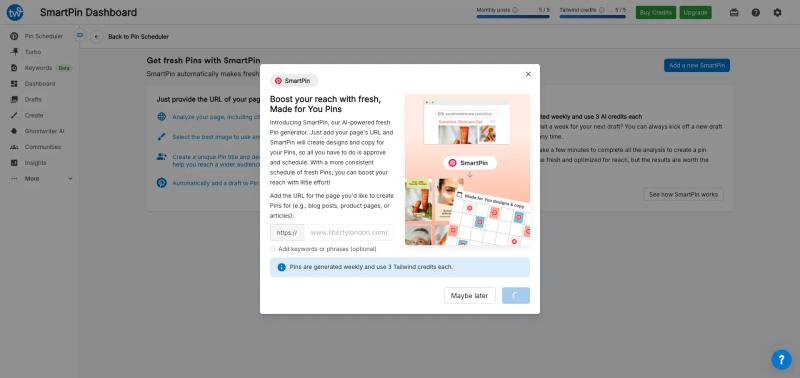
Tailwind has added features like SmartPin.
But based on usage, it’s still quite basic.
It generates pins from URLs, but:
- Limited control over output
- Inconsistent results
- Not much flexibility in scaling variations
So while it does automate part of the process, it’s still quite surface-level.
You’re not really controlling how content is generated or how it evolves over time.
This becomes more noticeable when you try to scale.
You still end up manually checking, adjusting, and filling gaps in your content plan.
This is where newer approaches feel different.
For example, tools like GenSumo use AI Agents that go beyond just generating pins from a URL.
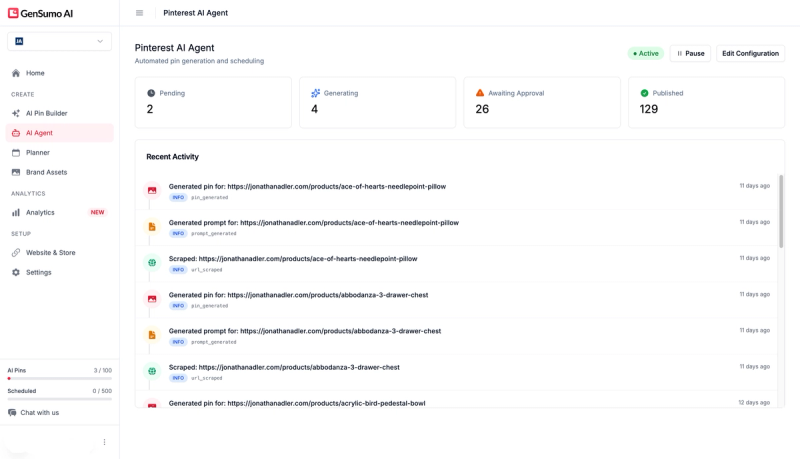
You can connect your website, let it plan content ahead, generate multiple pins, keep them ready for review, and then schedule everything in one flow.
It also handles things like spacing between posts and gradual scaling, so your activity looks more natural.
So instead of just “generate a few pins,” it’s closer to managing the whole workflow.
3. Pricing (Where It Gets Confusing and Expensive)
Tailwind uses a credit-based system, and this is where things start to feel less straightforward.
On paper, their starter plan looks affordable at around $25/month.
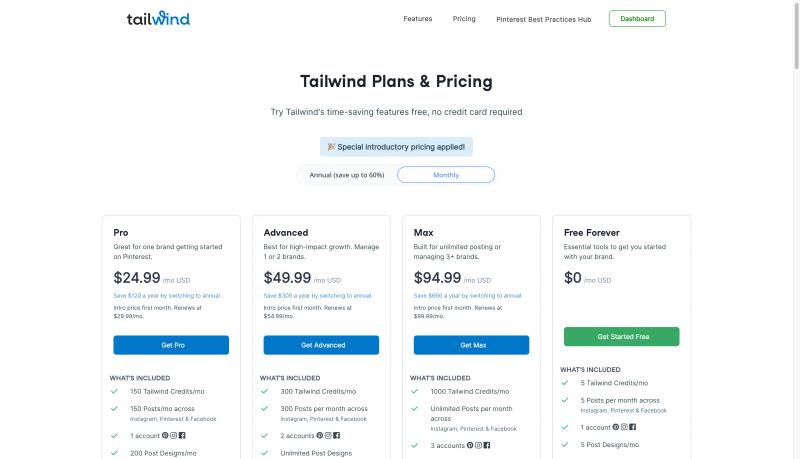
But instead of getting a clear number of pins or posts, you get credits.
And these credits get used across different features.
For example, generating a single AI pin can take around 3 credits.
So with 150 credits in the starter plan, you’re realistically creating about 50 AI pins.
And that’s assuming you don’t use credits for anything else like captions or other AI features.
This is where the gap shows up.
The pricing looks low, but the actual output is limited.
You end up thinking in credits instead of actual content, which makes it harder to predict how much you can create each month.
In comparison, tools like GenSumo are more direct.
At a similar price point around $29/month, you get 100 AI-generated pins and around 250 scheduled posts included.

No credit calculations, no guessing.
So for a small price difference, you’re getting roughly double the pin output, plus a lot more room to actually schedule and scale consistently.
Who Tailwind Is Best For?
Tailwind works best if your workflow is already set up.
- You create pins using Canva or another tool
- You just need a reliable scheduler
- You want to batch content and stay consistent
- You don’t need advanced automation
If your main goal is to plan and publish content without logging in daily, Tailwind does that well.
It’s also a good fit if you prefer control over everything and don’t want too much automation.
Who Should Consider a Tailwind Alternative?
Tailwind starts to feel limiting when your needs change.
- You want better pin designs without switching tools
- You want to generate and test multiple variations quickly
- You’re trying to scale content, not just schedule it
- You want more automation across the full workflow
A lot of users mention that while Tailwind saves time, it doesn’t really improve results or help with growth.
So if your bottleneck is creation or scaling, not scheduling, you’ll likely need something more complete.
That’s where tools like GenSumo make more sense, since they focus on creating pins, automating content, and scheduling in one place instead of splitting everything across tools.
FAQs
Common questions about Tailwind app, pricing, features, and best alternatives for Pinterest growth.
Is Tailwind still worth it in 2026?
Yes, if your main need is scheduling.
It’s still one of the most reliable tools for planning and publishing pins consistently.
But if you’re looking for better pin creation or automation, it may feel limited.
Why do people look for Tailwind alternatives?
Mostly for three reasons:
- Pin creation is basic
- Automation is limited
- Credit-based pricing reduces output
Many users also feel it doesn’t directly help improve performance, just consistency.
What is the best Tailwind alternative?
It depends on what you need.
If you want a similar scheduler, tools like Publer or Metricool can work.
If you want a more complete workflow including creation and automation, GenSumo AI is a stronger alternative.
Can Tailwind grow your Pinterest account?
It can help you stay consistent, which is important.
But growth depends more on pin quality, testing, and strategy.
Tailwind doesn’t directly help with those areas.
