





If you’re considering Tailwind, pricing is usually where things start to feel a bit unclear.
On the surface, it looks affordable. Plans start around $25/month, which feels reasonable for a Pinterest tool that has been around for years.
But once you start using it, you realize the pricing is not really about the monthly fee.
It’s about credits.
And that changes how you should think about value.
A Quick Look at Tailwind Pricing Plans
Tailwind’s plans are structured around a mix of credits, scheduled posts, and account limits, rather than just one simple metric.
Here’s what each plan actually includes beyond just pricing.
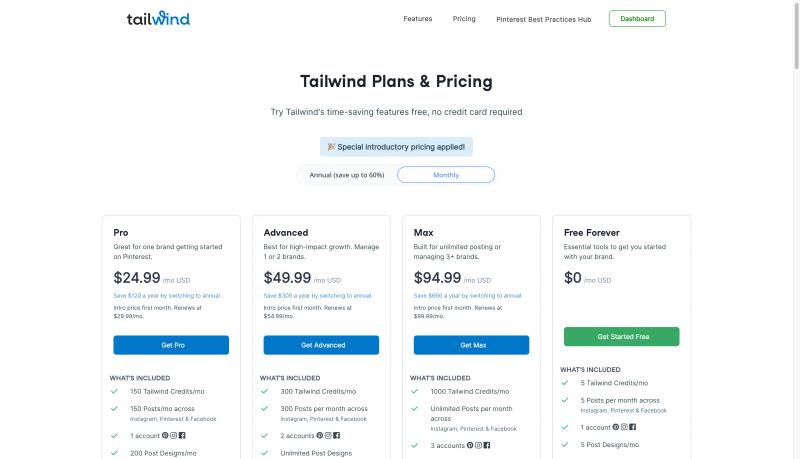
Free Plan ($0/month)
- 5 scheduled posts per month
- 1 account
- Supports Pinterest, Instagram, and Facebook
- 5 credits
- Basic analytics
This is mostly for trying the platform.
Pro Plan ($24.99/month)
- 150 scheduled posts per month
- 1 account
- Supports Pinterest, Instagram, and Facebook
- 150 credits
- 200 post designs per month
- Access to Tailwind Communities
- Advanced analytics
Good for a single brand getting started.
Advanced Plan ($49.99/month)
- 300 scheduled posts per month
- 2 accounts
- Supports Pinterest, Instagram, and Facebook
- 300 credits
- Unlimited post designs
- Unlimited Tailwind Communities
- Advanced analytics
Better suited if you’re managing more than one account.
Max Plan ($94.99/month)
- Unlimited scheduled posts
- 3 accounts
- Supports Pinterest, Instagram, and Facebook
- 1000 credits
- Unlimited designs
- Advanced analytics
- Team support (multiple users)
Built more for agencies or larger setups.
What Stands Out
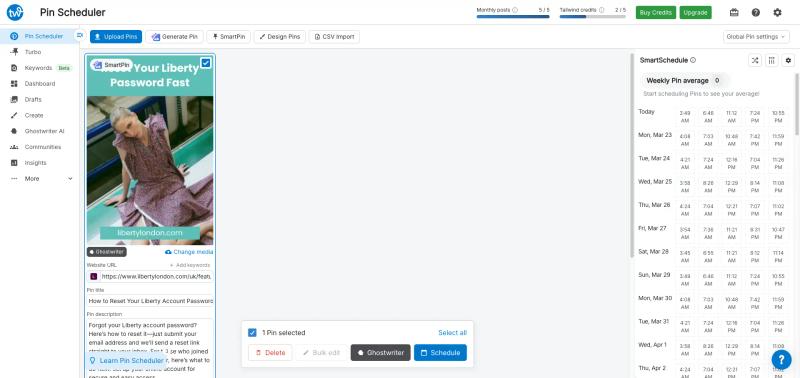
Across all plans, Tailwind is not just a Pinterest tool anymore.
It supports:
And the limits are divided across:
- Number of scheduled posts
- Number of connected accounts
- Monthly credits for AI features
So instead of one clear limit, you’re managing multiple constraints at once.
This is important to understand before choosing a plan, because your usage will depend on which of these limits you hit first.
The Credit System Changes Everything
Tailwind uses credits for its AI features.
That includes things like:
- AI pin generation
- Smart content creation
- Copywriting
Here’s the important part.
Generating a single AI pin usually takes around 3 credits.
So if you’re on the Pro plan with 150 credits:
You’re not getting 150 pins.
You’re getting closer to 50 pins per month.
And that’s assuming you don’t use credits anywhere else.
Why It Starts to Feel Expensive
This is where many users get surprised.
You start with a plan that feels affordable.
But then:
- Credits run out faster than expected
- You hesitate to use features freely
- You start calculating usage instead of focusing on growth
Over time, it creates friction.
Instead of thinking about content, you’re thinking about credits.
The Real Cost Per Pin
If you break it down:
- $25/month
- ~50 AI pins
That puts the cost at roughly $0.50 per pin
And that’s before considering:
- Quality of output
- Time spent fixing designs
- Additional tools you might still need
So the pricing is not high on paper, but it becomes noticeable in practice.


Generate pins with AI agent on autopilot
Create, schedule, and grow your Pinterest presence effortlessly with AI-powered automation.
Try GenSumo FreeComparing a Different Approach
One thing you start to notice when comparing tools is how different the pricing philosophies are.
Tailwind is built around credits.
Newer tools are starting to move away from that.
Instead of limiting actions, they define output.
For example, with GenSumo:
- $29/month
- 100 AI-generated pins
- Around 250 scheduled posts
There’s no credit system in the background.
You don’t have to think about how many actions something will cost.
You just know what you can create in a month.
And that changes how you use the product.
You spend less time managing limits and more time actually creating, testing ideas, and improving what works.
So Is Tailwind Pricing Worth It?
It really comes down to how you plan to use it.
Tailwind still makes sense if your needs are simple.
- You mainly want a scheduler
- You’re not heavily using AI features
- You’re comfortable working within a credit system
In that setup, it does the job well.
But things start to shift once your workflow becomes more content-heavy.
If you’re trying to:
- Generate a larger number of pins
- Test different creatives and angles
- Scale consistently over time
then the credit system can start to feel limiting.
Final Thoughts
Tailwind’s pricing is not bad.
It’s just not as simple as it first appears.
The credit system makes a big difference in how much you can actually do every month.
If you’re aware of that going in, it’s easier to set the right expectations.
But if your goal is to create and scale without thinking about limits, you might find more value in tools that keep things simpler.
FAQs
Why does Tailwind use a credit system?
Tailwind uses credits to manage AI feature usage.
Instead of unlimited generation, you get a fixed number of actions per month. This helps control usage but can feel restrictive for active users.
How many pins can I generate with Tailwind?
On the Pro plan, you get 150 credits.
Since one AI pin typically takes around 3 credits, you can generate about 50 pins per month.
Do credits get used for other features?
Yes.
Credits are also used for things like AI copywriting and other smart features, so your total output may be even lower depending on usage.
Is Tailwind cheaper than other tools?
At first glance, yes.
But when you calculate the number of pins you can actually create, the cost can be similar or even higher compared to tools that offer fixed outputs.
What is the main limitation of Tailwind pricing?
The main limitation is the credit system.
It adds friction, limits usage, and makes it harder to scale without upgrading plans.
Is there a better alternative to Tailwind pricing?
If you prefer predictable usage without tracking credits, tools like GenSumo offer a more straightforward model.
You get a fixed number of pins and scheduling capacity, which makes planning easier.
