





Pinflux has been around for a while and shows up whenever people search for Pinterest automation tools.
But after spending time with it, most users run into the same set of problems.
It is a Windows-only desktop app, it uses automation patterns that Pinterest has gotten much better at detecting, and the support and reliability are inconsistent.
In this article, I’ll cover the best PinFlux alternatives available today.
Why People Look for Pinflux Alternatives
A few issues come up consistently across user reviews:
- It only runs on Windows. There is no cloud dashboard or browser access. You need a specific PC or VPS running at all times.
- It uses automation tactics that Pinterest now detects. Bulk repinning, follow and unfollow at scale, and repeated descriptions are patterns the platform flags.
- Core features break regularly. The follow and unfollow automation has been reported to malfunction, repeatedly targeting the same accounts.
- Connecting a business Pinterest account is unreliable. This is a problem for anyone running a professional account.
- Support response times are slow and the documentation is incomplete.
The deeper issue is that Pinflux was built around how Pinterest worked several years ago. The platform has changed, and the automation style it relies on carries real account risk today.
The Best Pinflux Alternatives
1. GenSumo
GenSumo is built specifically for Pinterest and takes a different approach from Pinflux entirely.
Instead of automating engagement actions like repins and follows, it focuses on creating better pins and scaling content without the account risk.
The main features include:
- AI pin creation from a prompt: You describe what you want and it generates a full pin design including layout, visuals, and text.
- Brand kit support: Your colors, fonts, and logo are applied consistently across everything the AI creates.

- Multiple variations: You can generate several pin designs at once and test which performs better.
- AI Agent for full workflow automation: You connect your website or content topic, and the agent plans the content, creates the pins, and queues them for scheduling. It spaces posts naturally so your account activity looks organic.
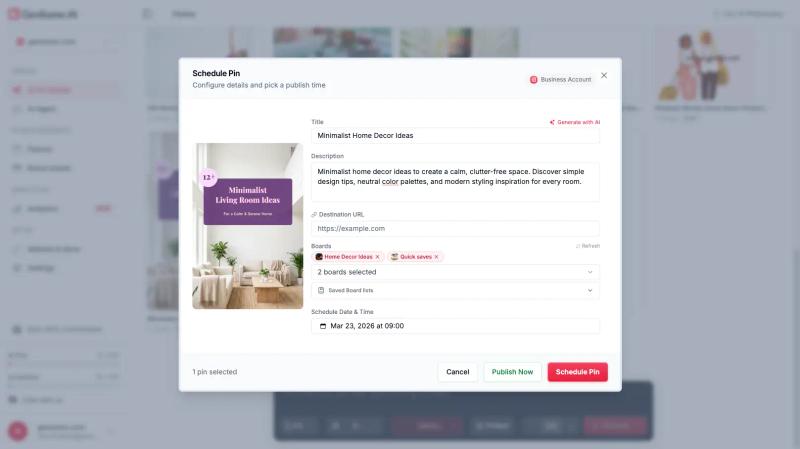
- Multi-board scheduling: Schedule pins across multiple boards without switching tools.
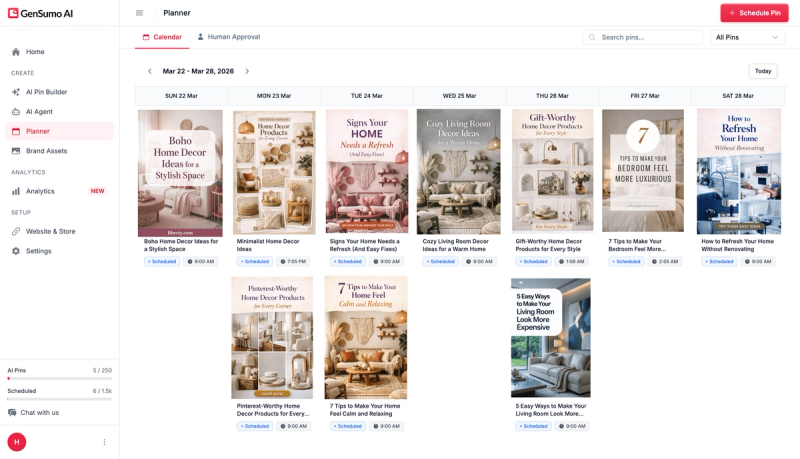
- A content planner to see and manage everything in one place.
The difference from Pinflux is that growth comes from content quality rather than activity volume. There are no bulk actions that put your account at risk.
Pricing starts at around $29 per month with 100 AI-generated pins and 250 scheduled posts included.
2. Tailwind
Tailwind is the most widely used Pinterest scheduling tool and has been around for years.
It works well for:
- Batch scheduling: Upload multiple pins at once and plan weeks or months ahead.
- SmartSchedule: Suggests the best posting times based on your account activity.
- Consistent publishing: Once your queue is set up, it runs without daily input.
Where it starts to fall short:
- Pin generation exists but the output is basic. Designs are simple and do not always match the source page accurately.
- Credit-based pricing makes it hard to predict output. At the starter plan, generating one AI pin costs around three credits, which limits total monthly volume.
- It does not help much with growth strategy, just consistency.
Tailwind is a good fit if you already have a design workflow and just need a reliable scheduler. If you need help with creation or want more automation, it starts to feel limited.
3. Pin Generator
Pin Generator is a cloud-based tool focused on turning existing content into pins quickly.
You feed in a blog post or product URL and it creates pin images and descriptions automatically. It includes:
- Customisable templates for consistent branding.
- Bulk pin creation from URLs.
- Built-in keyword suggestions for titles and descriptions.
- Scheduling once pins are created.
The output is template-based, which is efficient but less flexible if you want highly custom designs.
A good option if your main goal is turning blog content into pins without a lot of manual work.
4. Publer
Publer is a multi-platform social media tool that includes Pinterest alongside Instagram, Facebook, LinkedIn, and others.
For Pinterest it covers:
- Scheduling and bulk posting.
- Multi-account management.
- A clean dashboard for managing content across channels.
It does not include pin creation, so you still need a design tool. A good fit if Pinterest is one of several platforms you manage and you want everything in one scheduler.
5. Metricool
Metricool is another multi-platform tool with a stronger focus on analytics.
Useful for:
- Scheduling pins across accounts.
- Tracking reach, engagement, and performance over time.
- Understanding what content works and adjusting accordingly.
Like Publer, it does not handle pin creation. Best suited for people who want solid reporting alongside scheduling.
Which Tool Fits Your Situation
If your concern with Pinflux is account safety, GenSumo is the clearest alternative. It does not use follow or repin automation, so there is no activity to flag. Growth comes from publishing better content more consistently.
If you have a design workflow already and just need scheduling, Tailwind is the most proven option.
If you want to turn blog posts into pins quickly, Pin Generator is focused enough to do that job well.
If you manage multiple platforms, Publer or Metricool handle Pinterest alongside other channels without needing separate tools.


Generate pins with AI agent on autopilot
Create, schedule, and grow your Pinterest presence effortlessly with AI-powered automation.
Try GenSumo FreeA Note on Account Safety
Pinterest has significantly improved how it detects unnatural behaviour. The patterns that tools like Pinflux automate — bulk repinning, following and unfollowing at scale, repeated descriptions — are exactly what the platform now flags.
The consequences range from reduced reach to full account suspension, sometimes without warning. For an account built up over months or years, that is a real loss.
The safer approach is to automate content creation and scheduling rather than account activity. Creating more pins, staying consistent, and testing variations are what drive growth on Pinterest today without the associated risk.
Final Thoughts
Pinflux made sense when it was built, but Pinterest has moved past the approach it relies on.
If you want a tool built for how Pinterest works today, GenSumo is worth trying.
It handles creation, planning, and scheduling in one place, and it does not put your account at risk in the process.
If your needs are more specific, the other tools on this list each do their job well. Match the tool to the actual gap in your workflow.
Frequently Asked Questions
Is Pinflux safe to use for Pinterest in 2026?
There is real risk. Pinterest now detects the bulk automation patterns Pinflux relies on, including mass repinning, follow and unfollow activity, and repeated descriptions. Accounts using these tactics can face reduced reach, restrictions, or suspension.
Why is Pinflux a desktop app and does it matter?
Pinflux runs as a Windows application rather than in the cloud. You need a specific machine or VPS running at all times to use it. For most people managing Pinterest today, cloud-based tools are more practical since they work from any browser on any device.
What is the main difference between Pinflux and GenSumo?
Pinflux automates engagement activity like repinning and following. GenSumo automates content creation and planning. The underlying approach is different. Pinflux tries to grow through volume of activity. GenSumo focuses on growing through better pins created more consistently.
Can I switch tools without losing my Pinterest account data?
Yes. Switching tools has no effect on your Pinterest account. Your pins, boards, followers, and analytics stay exactly as they are. You are only changing how you manage and create content going forward.
What should I look for in a Pinflux alternative?
Cloud access so you can manage Pinterest from anywhere, safety features that work within Pinterest guidelines rather than against them, and help with pin creation so you are not spending hours designing manually. Scheduling and analytics are useful additions but creation is usually where people feel the most friction.
