





I have spent the last few years testing nearly every Pinterest tool out there. Some I stuck with for months. Others I dropped within a week.
This is a breakdown of the tools I think are actually worth using in 2026. Not a list pulled from affiliate roundups. Just what works, what doesn't, and where each tool fits depending on what you need.
Quick Comparison
| Tool | Best For | AI Pin Creation | Scheduling | Analytics | Pricing |
|---|---|---|---|---|---|
| GenSumo | AI pin design + full automation | Good | Yes | Yes | $29/mo |
| Tailwind | Scheduling + communities | Basic | Yes | Yes | $24.99/mo |
| Canva | Manual design control | Good | Yes | No | $13/mo Pro |
| BlogToPin | Blog-to-pin automation | Basic | Yes | Yes | $39/mo |
| PinClicks | Pinterest SEO + keyword research | No | No | Yes | $29/mo |
| PinInspector | Competitor research | No | No | No | $67 one-time |
| Hootsuite | Multi-platform teams | No | Yes | Yes | $149/mo |
| Sendible | Agency social management | No | Yes | Limited | $29/mo |
Tool | Best For | AI Pin Creation | Scheduling | Analytics | Starting Price
GenSumo | AI pin design + full automation | Yes (from scratch) | Yes | Yes | $29/mo
Tailwind | Scheduling + communities | Basic (SmartPin) | Yes | Yes | $14.99/mo
Canva | Manual design control | No | Limited | No | Free / $13/mo Pro
BlogToPin | Blog-to-pin automation | Template-based | Yes | No | $19.99/mo
PinClicks | Pinterest SEO + keyword research | No | No | Yes | $29/mo
PinInspector | Competitor research | No | No | Limited | $67 one-time
Hootsuite | Multi-platform teams | No | Yes | Yes | $99/mo
Sendible | Agency social management | No | Limited | Yes | $29/mo
1. GenSumo
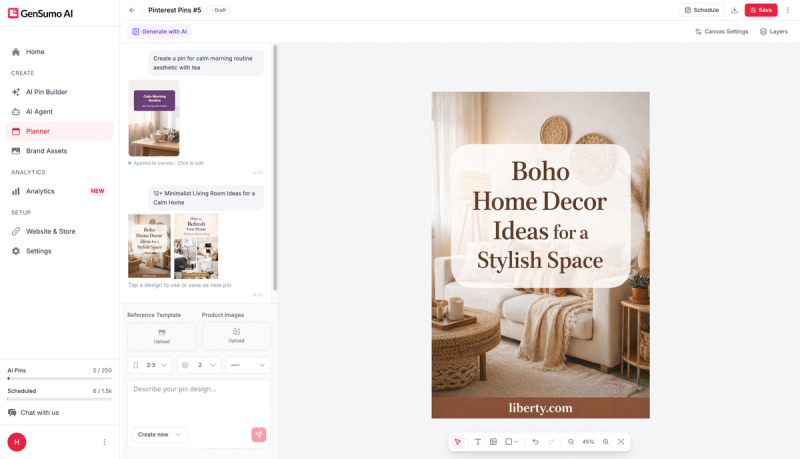
GenSumo is the only tool on this list that creates original pin designs using AI.
You describe what you want, pick a style, and the AI generates a complete pin with layout, images, text overlays, and your brand elements baked in.
The output is editable. If something is off, you tweak it directly.
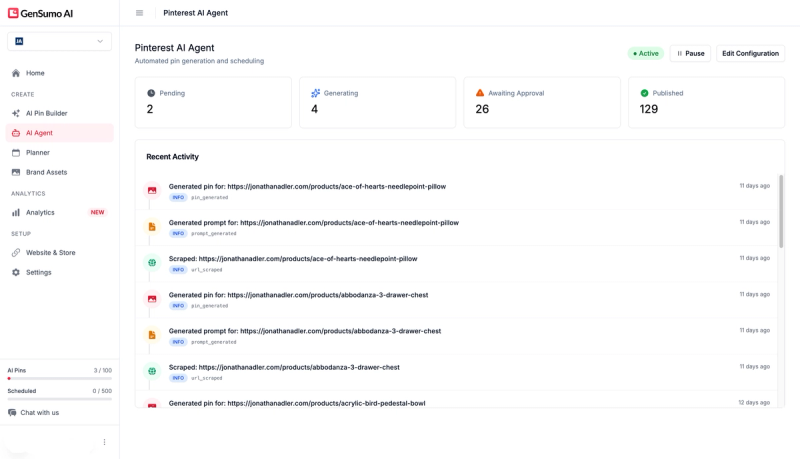
What separates it from everything else here is the AI agent.
You connect your website or give it a content topic, and it plans your content calendar, creates the pins, and queues everything for review.
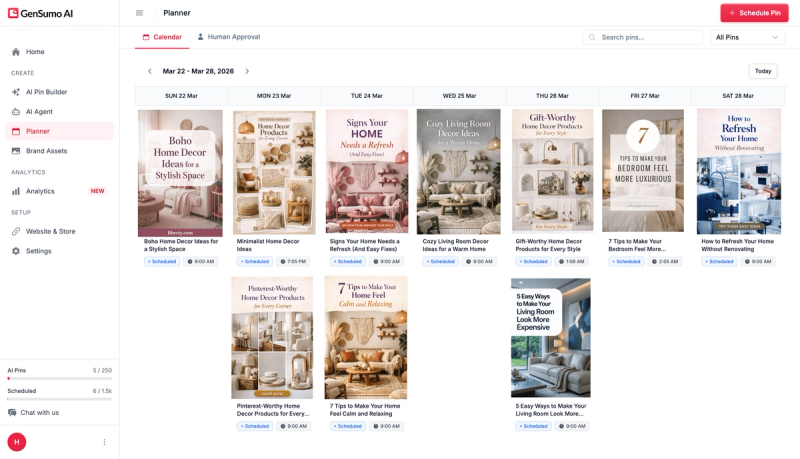
The scheduling works well. Multi-board support is built in, and the calendar view makes it easy to see what is going out and when.
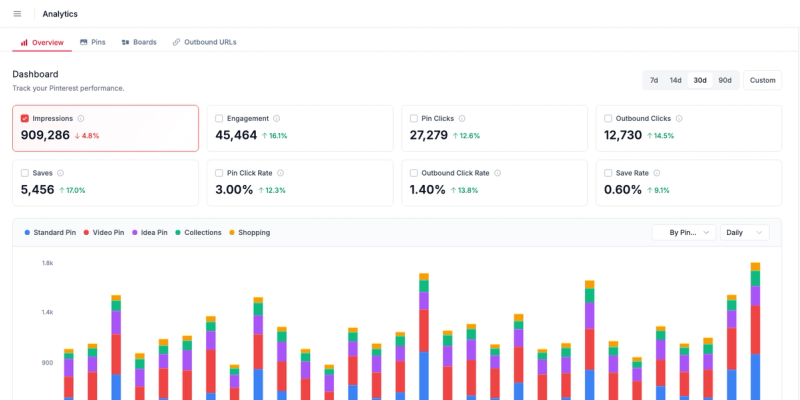
On the analytics side, it covers the basics. Impressions, saves, clicks. Not as deep as PinClicks, but enough to know what is working without leaving the platform.
The brand kit feature is genuinely useful. Your logo, colours, fonts get applied automatically. No more manually matching hex codes across fifty pins.
Pricing starts at $29 per month for 100 AI pins and 500 scheduled posts. The Growth plan at $67 covers three accounts with 250 AI pins. There is a 14-day free trial with no card required.
If you are looking for one tool that handles creation, scheduling, and planning together, this is the one I would start with.
2. Tailwind
Tailwind has been in the Pinterest space longer than anyone else.
The scheduling is rock solid. SmartSchedule picks optimal times based on your audience data, and the queue system means you can load a week of content in one sitting.
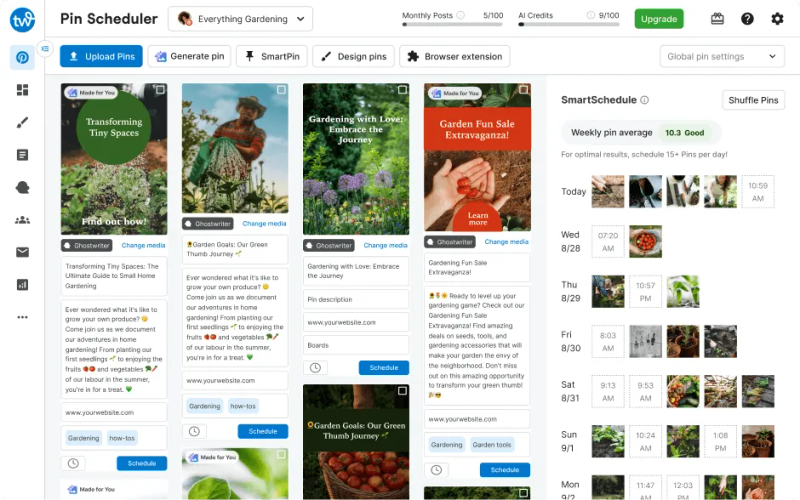
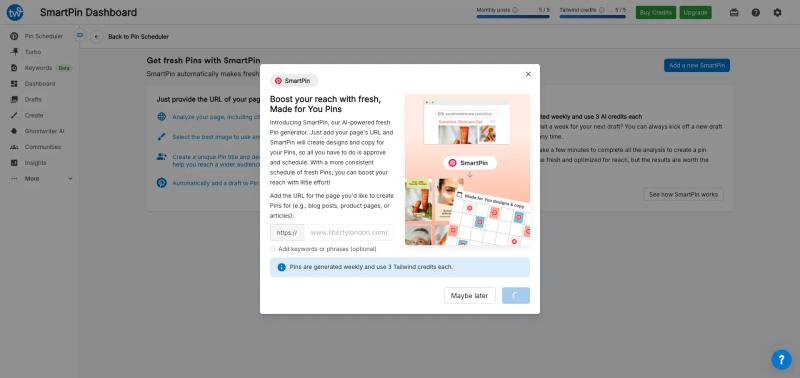
They added SmartPin recently, which generates pin variations automatically. It works, but the designs are functional rather than polished. Fine for volume, less so if brand aesthetics matter to you.
Tailwind Communities used to be called Tribes. They are group boards where members share each other's content. Useful for reach if you are in a niche like food or DIY where communities are active.
Analytics are also solid. You get performance data on pins, boards, and overall account health. The insights are actionable rather than just decorative dashboards.
Pricing starts at $14.99 per month on the Pro plan. Advanced is $24.99 with more accounts and communities. It is affordable and reliable, but the creative tools are limited.
Best for bloggers and small creators who need dependable scheduling with some analytics. Not ideal if design quality is your priority.
3. Canva
Canva is not a Pinterest marketing tool. But a lot of Pinterest creators use it daily because the design experience is just better than anything else.
The template library is massive and the editor is intuitive. Drag, drop, resize, done.
You get full control over every element. Fonts, images, spacing, brand colours. For anyone frustrated with the rigid template systems in tools like BlogToPin or Pin Generator, Canva is a relief.
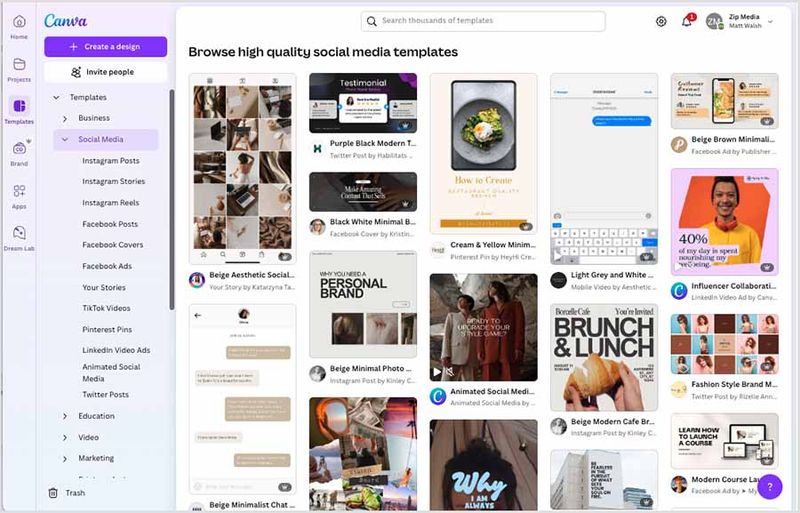
There is a built-in Pinterest scheduler now. You can publish directly to your boards from inside Canva. It is basic compared to Tailwind or GenSumo, but it saves a step.
Free tier covers a lot. Pro is $13 per month and unlocks background remover, brand kits, and premium templates.
Best if design control is your top priority and you do not mind the manual work.
4. BlogToPin
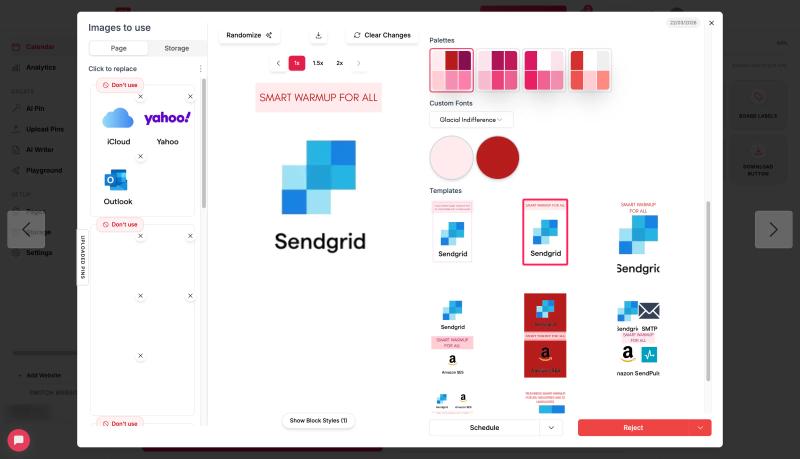
BlogToPin does exactly what the name suggests. Give it a blog URL and it scans the page, pulls images and text, applies a template, writes a description, and schedules the pin.
The automation is impressive. You can process hundreds of blog pages in one go. It limits itself to one pin per URL per day to avoid spam flags, which is a smart default.
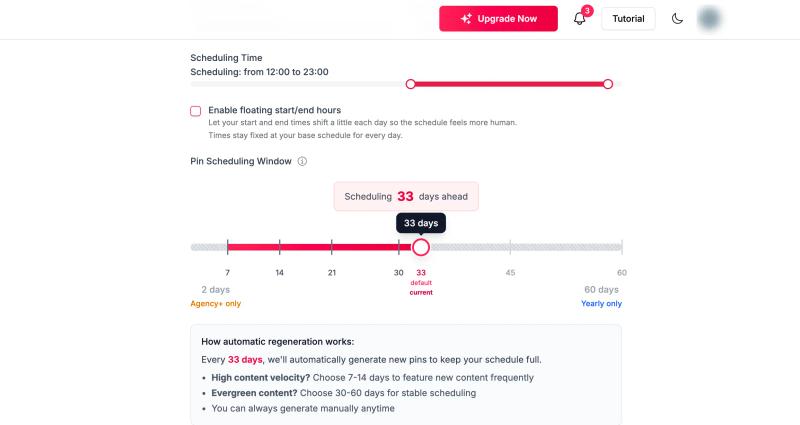
Template support is decent. You can import Canva SVG templates, which gives more design flexibility than most automation tools offer.
It integrates with Shopify, WooCommerce, and Etsy for product pins. If you run an e-commerce store and want to turn your catalogue into scheduled Pinterest content, this handles it.
Where it falls short is originality. The pins look templated because they are. If you are pinning dozens of posts from the same site, the visual repetition becomes obvious.
Pricing starts at $39 per month billed annually with a 7-day free trial.
Best for bloggers with large content libraries who need volume over visual variety.
5. PinClicks
PinClicks is purely a research and analytics tool.
It does not create pins or schedule anything. What it does is help you understand what works on Pinterest and why.
The Interest Explorer is its standout feature. It gives you access to over 11 million official Pinterest interest annotations. These are the actual categories Pinterest uses internally to classify content. Knowing these helps you write descriptions that align with how the algorithm sorts pins.
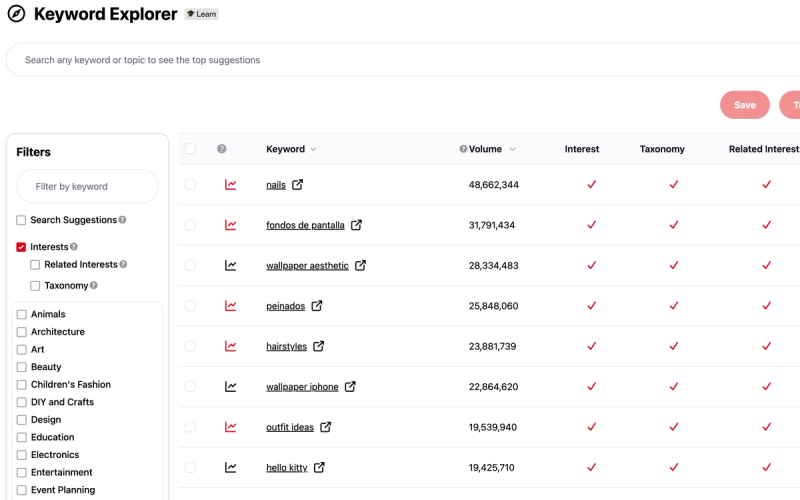
Keyword Explorer shows search volume and competition for Pinterest-specific keywords. This is different from Google keyword data. What ranks on Pinterest often has nothing to do with what ranks on Google.
Rank tracking lets you monitor where your pins appear for specific keywords over time. Useful for understanding whether your SEO efforts are actually moving the needle.
There is a Chrome extension that overlays data directly on Pinterest while you browse. Handy for quick competitor research without switching between tools.
Pin Pro plan is $29 per month. Pin Plus at $49 adds bulk exports, alerts, and deeper analytics. Annual billing saves about 28 percent.
Best for creators who take Pinterest SEO seriously and want data-driven decisions. Pair it with a creation tool like GenSumo or Canva for a complete workflow.
6. PinInspector
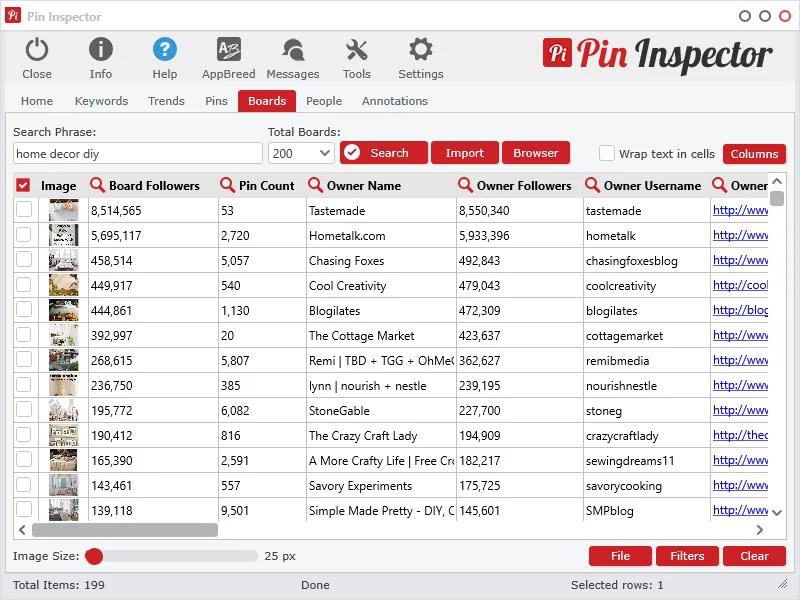
PinInspector is a desktop research tool with a one-time payment model. No subscriptions. Pay $67 once and you own it.
It scrapes Pinterest for data on pins, boards, and profiles. You can pull up to 52 data points per pin, including engagement metrics, descriptions, and board placement.
The Browse and Scrape feature lets you inspect pins directly in the feed and understand what makes top performers tick. Good for competitive analysis if you want to reverse-engineer what is working in your niche.
It includes Keywords Everywhere integration for search volume data. There is also a media downloader for building swipe files, which is useful for design inspiration.
The interface feels dated. It is a Windows desktop application, not a web app. And since it scrapes data rather than pulling from the API, results can occasionally be inconsistent.
No scheduling. No pin creation. No analytics dashboard. Purely a research tool.
Best for one-time competitive deep dives or niche research. The lifetime pricing makes it low-risk to try.
7. Hootsuite
Hootsuite is an enterprise social media platform that happens to support Pinterest. It is not built for Pinterest specifically, but it covers the basics.
You can schedule pins, preview how they will look in the feed, and track basic performance metrics. The social listening tools let you monitor keywords and brand mentions across platforms, Pinterest included.
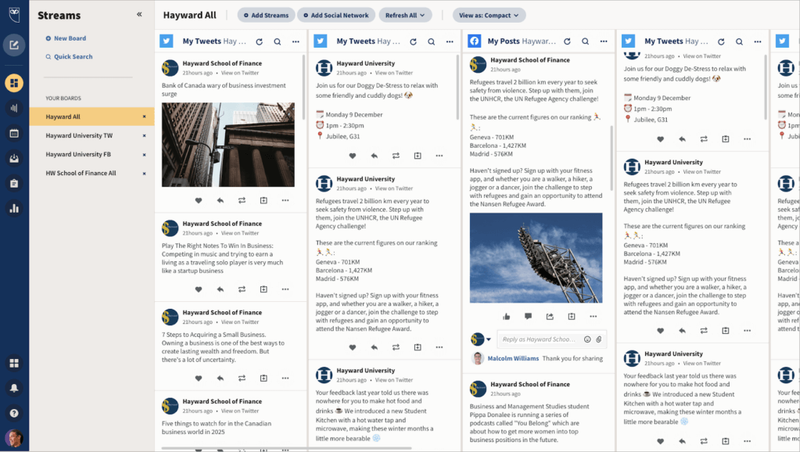
The dashboard is designed for teams managing multiple social channels. If Pinterest is one of eight platforms you are handling, having everything in one place has value.
But it is expensive.
The entry plan is $149/mo per month for a single user. That is more than most dedicated Pinterest tools charge for their top tier. And the Pinterest-specific features are thin compared to what Tailwind or GenSumo offer at a fraction of the cost.
No pin creation. No Pinterest-specific keyword tools. No AI features for Pinterest content.
Best for marketing teams already using Hootsuite for other platforms who want to add Pinterest without adopting another tool. Not worth it if Pinterest is your primary focus.


Generate pins with AI agent on autopilot
Create, schedule, and grow your Pinterest presence effortlessly with AI-powered automation.
Try GenSumo Free8. Sendible
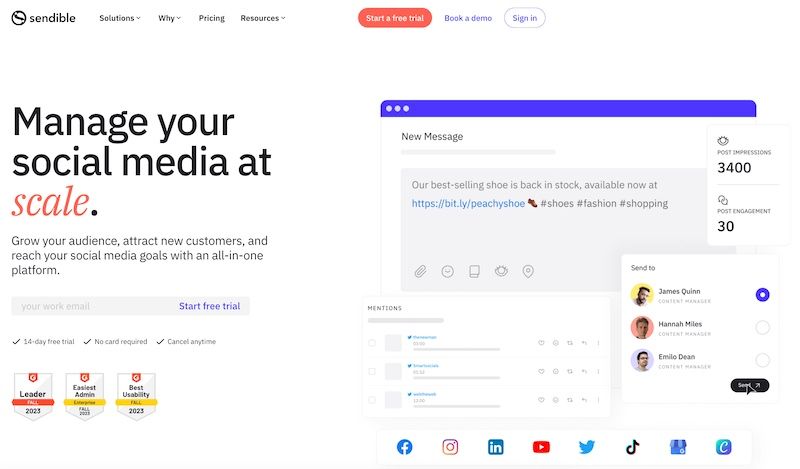
Sendible is an agency-focused social media management platform. Scheduling, reporting, client management, team workflows. It covers a lot of platforms well.
The catch with Pinterest is that support has been inconsistent. Sendible dropped Pinterest integration at one point, brought it back in 2021, and as of 2026 it is only available to a subset of users. Not everyone can add Pinterest boards.
If you do have access, the scheduling and reporting work. Bulk scheduling via CSV is useful for high-volume workflows. The approval system is good for agencies where clients need to sign off before anything goes live.
Analytics and reporting are strong across the platforms it fully supports. Facebook, Instagram, LinkedIn reports are solid. Pinterest reporting is more limited.
Pricing starts at $29 per month for the Creator plan. But given the unreliable Pinterest support, it is hard to recommend it as a Pinterest marketing tool specifically.
Best for agencies managing multiple social platforms who occasionally need Pinterest. Not a fit if Pinterest is your main channel.
How to Choose the Right Pinterest Marketing Tool
If you want one tool that creates pins, schedules them, and plans your content strategy, GenSumo is the most complete option right now. The AI agent alone saves hours of manual work each week.
If scheduling is your main need and you want something proven, Tailwind is the safe choice. It has a decade of Pinterest-specific experience behind it.
If you care most about design and want full creative control, Canva is unmatched. Just be prepared to do everything manually.
If Pinterest SEO and keyword research drive your strategy, PinClicks gives you data no other tool on this list provides.
Hootsuite and Sendible make sense only if Pinterest is a small part of a larger multi-platform operation.
Frequently Asked Questions
What is the best Pinterest marketing tool in 2026?
It depends on your workflow. For all-in-one creation and scheduling, GenSumo covers the most ground. For pure scheduling, Tailwind is the most established. For analytics and keyword research, PinClicks is the strongest option.
Do I need a separate Pinterest analytics tool?
Not necessarily. GenSumo and Tailwind both include analytics. But if Pinterest SEO is a core part of your strategy, PinClicks provides deeper keyword and ranking data that general-purpose tools do not offer.
Is Canva good enough for Pinterest marketing?
For design, absolutely. But Canva does not offer meaningful scheduling, automation, or analytics. Most serious Pinterest marketers use Canva alongside a dedicated scheduling tool.
Are Pinterest automation tools safe to use?
Tools that use the official Pinterest API, like Tailwind and GenSumo, are safe. They conform to Pinterest's publishing guidelines. Be cautious with tools that scrape or use unofficial methods, as these can trigger account flags. Read more in our Pinterest SEO guide.
What is the cheapest Pinterest marketing tool?
PinInspector at $67 one-time is the cheapest overall. For subscription tools, Canva's free tier and Tailwind's Pro plan at $14.99 per month are the most affordable entry points.
Can I use multiple Pinterest tools together?
Yes, and many marketers do. A common setup is GenSumo or Tailwind for creation and scheduling, PinClicks for keyword research, and Canva for custom one-off designs. The tools serve different functions and work well alongside each other.
