





Most people don’t struggle with posting on Pinterest. They struggle with knowing what is actually working.
You can publish consistently and still see flat results if you are not paying attention to the right signals. Impressions, saves, clicks, outbound traffic. These numbers tell you what to double down on and what to stop doing.
That is where analytics tools come in.
Some give you a simple view of your top-performing pins. Others go deeper into trends, audience behavior, and content performance across time.
In this guide, we will look at the best Pinterest analytics tools in 2026 and how they help you make better decisions, not just collect more data.
Quick Comparison of Best Pinterest Analytics Software
| Tool | Best For | Pinterest-Specific | Custom Reports | Scheduling | Price |
|---|---|---|---|---|---|
| GenSumo | Analytics + creation + scheduling | ✓ | ✗ | ✓ | $29/mo |
| Pinterest Analytics | Free native data | ✓ | ✗ | ✗ | Free |
| Tailwind | Scheduling + board-level data | ✓ | ✗ | ✓ | $14.99/mo |
| Sprout Social | Enterprise reporting | Partial | ✓ | ✓ | $199/mo |
| Hootsuite | Multi-platform teams | Partial | ✓ | ✓ | $99/mo |
| DashThis | Client-facing reports | Partial | ✓ | ✗ | $49/mo |
| Power My Analytics | Looker Studio connector | Partial | ✓ (via Looker) | ✗ | $9.95/mo |
1. GenSumo
Most analytics tools sit in a silo. You check your numbers in one tab, create pins in another, and schedule everything in a third.
GenSumo collapses that into one workflow.
The analytics dashboard sits right alongside the pin creator and scheduler, which means you can look at what performed well and immediately create more of it.

The metrics it tracks are focused on what matters for decision-making.
Impressions, saves, pin clicks, and outbound clicks.
You can see performance at the pin level, which helps you identify which specific designs and topics are pulling their weight versus which ones fell flat.
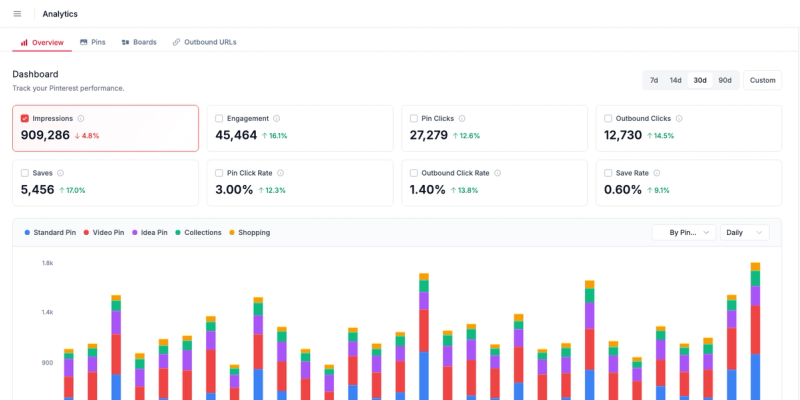
What makes this particularly useful is the feedback loop.
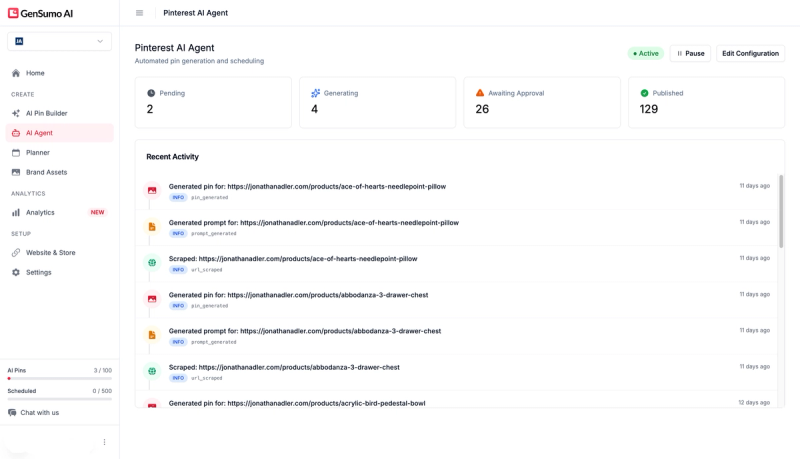
The AI agent uses your performance data to inform what it creates next.
So the more you publish, the better the system gets at understanding what resonates with your audience. That is a very different experience compared to checking a dashboard and then manually adjusting your strategy.
Is it the deepest analytics platform on this list?
No. You will not find custom report builders or white-label PDF exports here. But if you want analytics that are directly connected to your content creation and scheduling pipeline, this is the most integrated option available.
Pricing starts at $29 per month. Analytics are included on all plans alongside the AI pin creator and scheduler. There is a 14-day free trial with no card required.
2. Pinterest's Built-in Analytics
Before spending money on any third-party tool, it is worth getting familiar with what Pinterest gives you for free.
If you have a business account (which is also free), you get access to a native analytics dashboard that covers more ground than most people realise.
The overview section shows your headline numbers: impressions, saves, pin clicks, outbound clicks, and profile visits over a date range you choose.
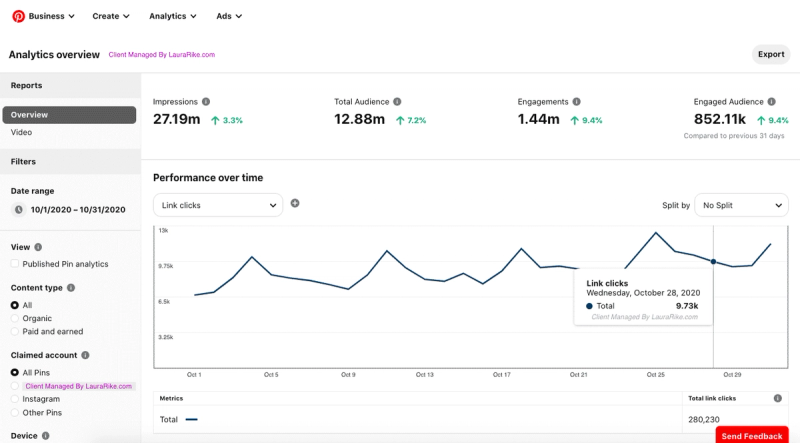
You can filter by organic versus paid performance, which is useful if you are running Pinterest ads alongside your organic content.
The Top Pins section is genuinely useful.
It highlights your best performers across saves, clicks, and impressions so you can study what worked.
Audience Insights shows demographics, interests, and categories your audience engages with, which can guide your content direction.
Where it falls short is historical depth and export flexibility. You only get 90 days of data, the interface can be slow to load, and there is no way to build custom reports or compare time periods side by side.
If you want to track trends over months or create reports for a client, you will need something else.
3. Tailwind
Tailwind was built for Pinterest from the start, and that shows in the analytics.
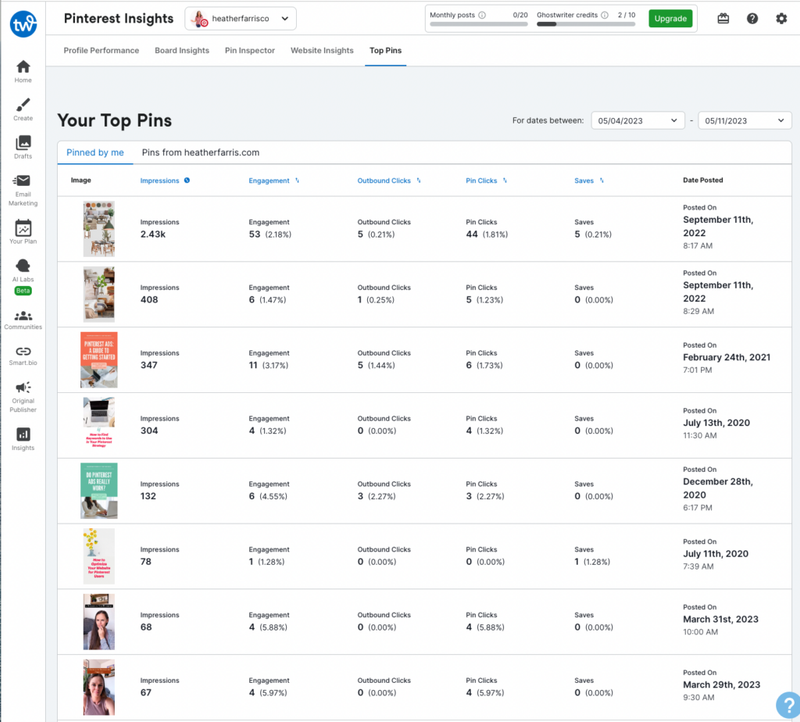
While most multi-platform tools bolt on Pinterest support as an afterthought, Tailwind gives you board-level insights, individual pin performance tracking, and engagement trends over time. We covered the full platform in our Tailwind review.
The board insights feature is particularly valuable. It tells you which boards are driving the most engagement and which ones are dead weight.
Pin Inspector identifies your top-performing content and shows you what made those pins work. Saves, clicks, repins, comments, engagement rate over time.
You can also connect Google Analytics to tie Pinterest activity back to website visits, transactions, and revenue, which closes the loop between social performance and actual business outcomes.
The limitation is reporting.
Tailwind does not offer custom report builders, white-label exports, or client-facing dashboards. The data is there, but you are looking at it inside Tailwind's interface and that is it.
For agencies that need polished reports, you will want to pair it with something like DashThis. Pricing starts at $14.99 per month. Full breakdown in our Tailwind pricing guide.
4. Sprout Social
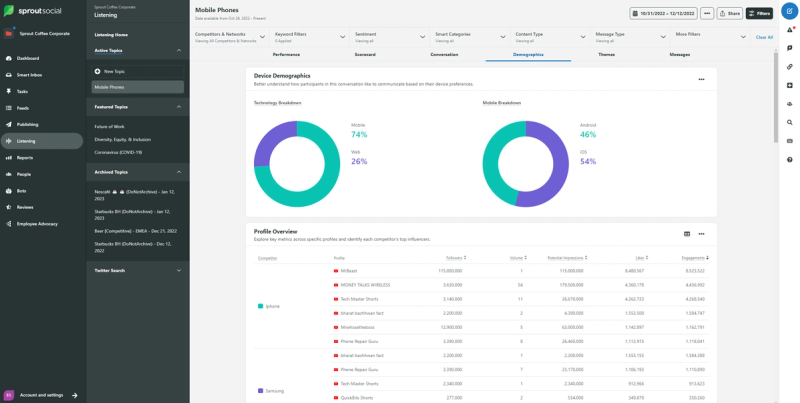
Sprout Social is built for teams and agencies that manage social media at scale.
If you are a solo creator, this is probably not for you.
But if you are running Pinterest alongside four other platforms for multiple clients, the centralised reporting is hard to beat.
The Pinterest analytics cover engagement, reach, clicks, and follower growth with the ability to drill down into individual pin performance. Where Sprout really earns its keep is in presentation.
The reports are clean, professional, and ready to put in front of a client or stakeholder without extra formatting work.
Cross-platform comparison is another strength.
You can see how your Pinterest content performs relative to your Instagram, LinkedIn, and Facebook content in the same report. For teams trying to justify budget allocation across channels, that comparative view is extremely useful.
The price is the barrier. Plans start at $199 per month per user. That is steep, and it is per seat, so a three-person team is looking at nearly $600 a month before you add any extras.
5. Hootsuite
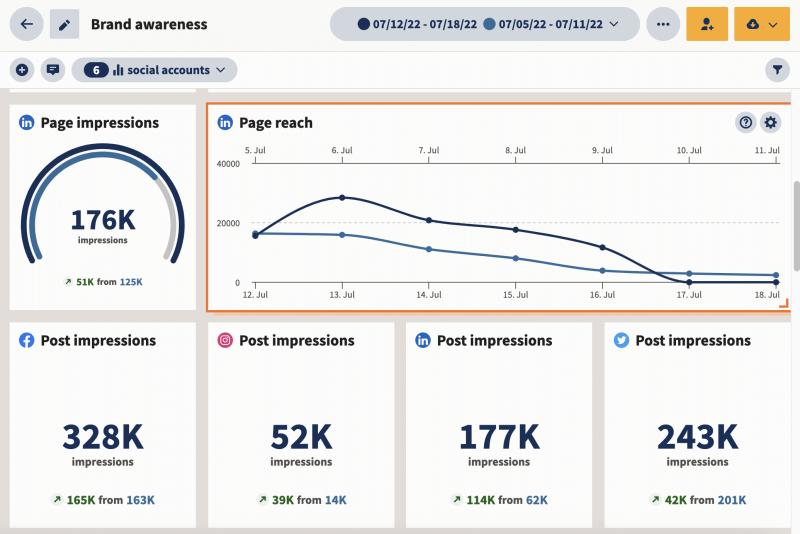
Hootsuite takes a similar angle to Sprout Social but at a slightly lower price point. The Pinterest analytics module tracks pin performance, audience engagement, and provides recommendations on optimal posting times based on when your followers are most active.
The social listening component adds a layer that most Pinterest tools do not offer. You can monitor keywords, brand mentions, and trending topics across Pinterest and other platforms simultaneously. If you are in a competitive niche and want to keep an eye on what competitors are doing, that has real value.
Custom reporting is available on higher plans, and you can export data in formats that work for client presentations.
The competitor benchmarking feature lets you compare your Pinterest performance against other accounts, which is something very few Pinterest-specific tools provide.
Pricing starts at $99 per month per user on the Standard plan. The Advanced plan at $249 per user unlocks the deeper analytics and reporting features. Like Sprout Social, the per-user pricing adds up fast for teams.
6. DashThis
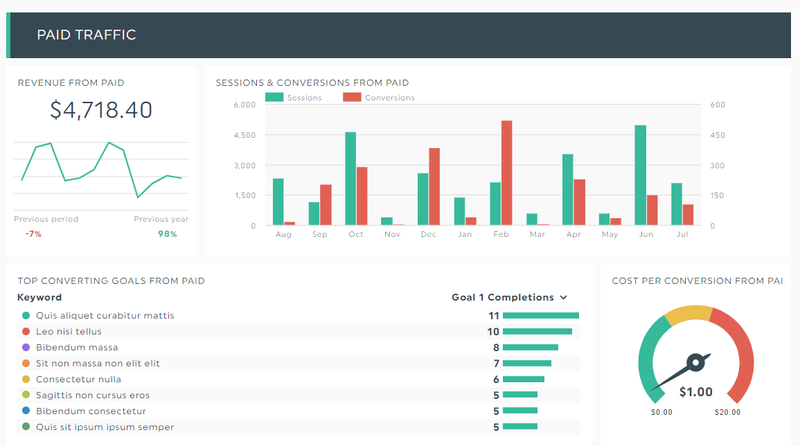
DashThis is not a Pinterest management tool. It is a reporting tool, and it does that one job exceptionally well.
If you are an agency or freelancer who needs to send clean, branded Pinterest reports to clients every month, this is probably the fastest way to do it.
It connects to both Pinterest organic data and Pinterest Ads, pulling metrics into preset widgets that you can drag and drop into a dashboard. Impressions, reach, clicks, ad spend, conversions. Everything updates automatically, so once you set up a report template you rarely need to touch it again.
The Individual plan starts at $49 per month for three dashboards. The Professional plan at $159 adds white-labelling and ten dashboards.
As of March 2026, DashThis is moving to source-based pricing, so your cost depends on both dashboard count and how many data sources you connect. If you are running Pinterest Ads and need to report on them alongside organic performance, DashThis handles both in one place.
7. Power My Analytics
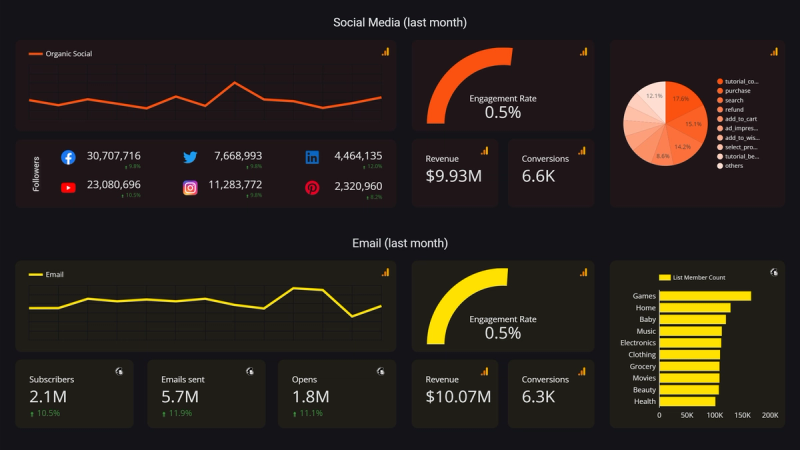
Power My Analytics takes a different approach to Pinterest reporting.
Instead of building its own dashboard, it acts as a data connector that pipes your Pinterest metrics directly into Looker Studio (formerly Google Data Studio), Google Sheets, or a data warehouse.
The appeal here is total control over how your data looks.
If you already use Looker Studio for other marketing reports, Power My Analytics lets you add Pinterest data to that same environment. You build the dashboards yourself, choose exactly which metrics to display, and design the layout however you want.
It supports both Pinterest organic analytics and Pinterest Ads data. You get metrics for overview, boards, and individual pins.
Pricing starts at $9.95 per month with a 14-day free trial, which makes it the cheapest option on this list by a wide margin. The catch is that you need to be comfortable with Looker Studio.


Generate pins with AI agent on autopilot
Create, schedule, and grow your Pinterest presence effortlessly with AI-powered automation.
Try GenSumo FreeWhich Pinterest Analytics Tool Should You Use?
Start with Pinterest's native analytics. It is free, accurate, and gives you a baseline understanding of how your content performs. Most creators can get surprisingly far with just this if they check it consistently and actually use the data to adjust what they pin.
If you also need scheduling alongside your analytics, our guide to the best Pinterest scheduling tools covers that side of things.
If you want analytics that connect directly to your content creation and scheduling workflow, GenSumo is the most integrated option. You see what works, create more of it, and schedule it all in one place. That closed loop is worth a lot when you are trying to grow consistently.
Agencies and teams managing multiple platforms should look at Sprout Social, Hootsuite, or DashThis depending on budget and reporting needs. And if you are a Looker Studio user who just needs a Pinterest data pipe, Power My Analytics is hard to beat at under $10 a month. For a broader look at tools across different Pinterest workflows, see our roundup of the best Pinterest marketing tools.
Frequently Asked Questions
What metrics should I track on Pinterest?
Focus on pin clicks and outbound clicks first. Those tell you whether people are actually leaving Pinterest to visit your content. Impressions show how visible your pins are, and saves indicate long-term value since saved pins keep circulating over time. Follower count matters less on Pinterest than on other platforms. For tips on improving visibility, our Pinterest SEO guide covers how search and discovery work on the platform.
Is Pinterest's free analytics enough?
For most individual creators and small businesses, yes. Pinterest's native dashboard covers the core metrics you need to make informed decisions. Third-party tools become valuable when you need historical data beyond 90 days, client-facing reports, cross-platform comparisons, or analytics that are integrated with your scheduling workflow.
Can I track Pinterest Ads performance with these tools?
Yes. Pinterest's native dashboard, DashThis, Power My Analytics, Hootsuite, and Sprout Social all support Pinterest Ads reporting. DashThis and Power My Analytics are particularly good for combining organic and paid Pinterest data into unified reports. If you are considering running ads, our breakdown of Pinterest Ads costs is worth reading first.
How often should I check my Pinterest analytics?
Once a week is enough for most people. Pinterest content has a longer lifespan than other social platforms, so checking daily will just show you noise. A weekly review lets you spot meaningful trends, identify which pins gained traction, and adjust your upcoming content accordingly. Monthly reviews are better for bigger strategic decisions like which boards to focus on or whether your overall approach needs changing.
What is the cheapest Pinterest analytics tool?
Pinterest's built-in analytics is free and covers the essentials. For third-party tools, Power My Analytics at $9.95 per month is the most affordable option, though it requires familiarity with Looker Studio. Tailwind at $14.99 per month offers the best combination of analytics and scheduling at a reasonable price point.
Do I need a Pinterest business account for analytics?
Yes. Pinterest only provides analytics to business accounts. The good news is that converting a personal account to a business account is free and takes about two minutes. You do not lose any of your existing pins or boards in the process. All third-party analytics tools also require a business account to pull data.
