





Most people think of Pinterest as social media. In reality, it behaves more like a search engine.
When someone types “small kitchen ideas” or “fall outfit inspiration” into the search bar, Pinterest shows results based on relevance, keywords, and engagement.
That is why Pinterest SEO matters.
If you want your pins to appear in search results and reach the right audience, you need to understand how Pinterest search optimization works.
In this guide, we will cover:
- What Pinterest SEO actually means
- How Pinterest search engine optimization works
- How to improve SEO on Pinterest step by step
- Pinterest SEO best practices that still work
Let’s break it down clearly.
Pinterest SEO is about helping your pins, boards, and profile rank in Pinterest search results.
To improve Pinterest search optimization:
- Use clear keywords in titles and descriptions
- Optimize boards and profile
- Create consistent, high quality vertical pins
- Post regularly
- Focus on search intent
Pinterest rewards relevance and consistency.
What Is Pinterest SEO?
Pinterest is not a typical social media platform. It functions as a visual discovery engine where people actively search for ideas, products, and solutions.
According to Pinterest’s official newsroom, the platform has over 619 million monthly active users worldwide, and a large percentage of them use Pinterest with clear intent to plan, research, and shop.
Unlike chronological feeds where posts fade quickly, Pinterest content can rank in search results for months or even years. That is why Pinterest SEO is not optional if you want consistent traffic.
Pinterest SEO (Pinterest Search Engine Optimization) is the process of optimizing your Pins, boards, and profile so they appear higher in Pinterest search results when users type relevant keywords.
It works similarly to Google SEO, but with two key differences:
- Visual relevance comes first
- Keywords support discovery
Every Pin acts like a searchable piece of content. If your Pin is optimized correctly, it can continue generating impressions, clicks, and saves long after it is published.
How Pinterest Search Works
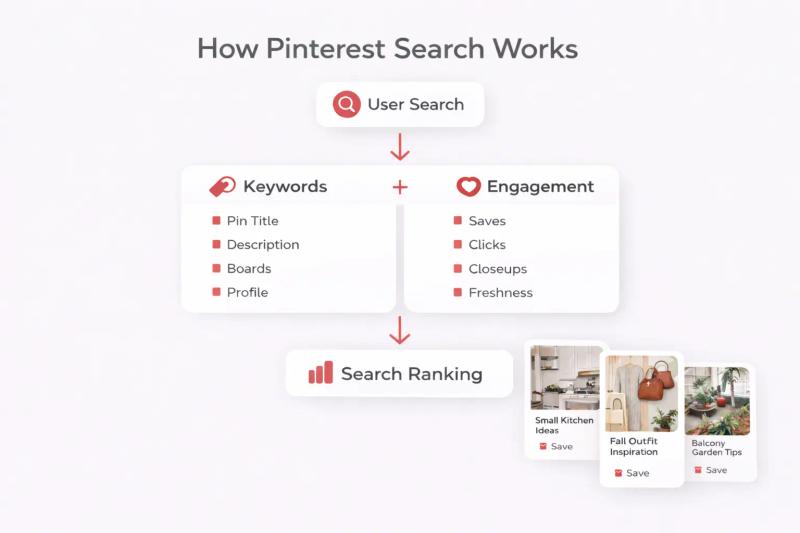
Pinterest search combines keyword matching with engagement signals.
When someone enters a search query, Pinterest scans for keywords in:
- Pin titles
- Pin descriptions
- Board names
- Board descriptions
- Profile bio
Then it evaluates performance signals such as:
- Saves
- Outbound clicks
- Closeups
- Overall engagement rate
- Content freshness
Pinterest’s official Search and Discovery documentation confirms that relevance and engagement help determine distribution.
There is also strong commercial intent on the platform. According to Pinterest Business insights, more than 80% of weekly Pinners have discovered a new brand or product on Pinterest. This highlights why ranking in search matters for creators and businesses.
In simple terms, Pinterest tries to show the most useful and relevant visual result for every search.
Getting Started With Pinterest SEO
Here’s how to improve your Pinterest SEO step by step.
1. Start With Keyword Research
Keywords on Pinterest are not the same as Google keywords, but the concept is similar: you want to use terms that real Pinterest users are searching for.
Try this simple method:
- Open Pinterest and start typing a broad idea into the search bar.
- Pay attention to the autocomplete suggestions — Pinterest is telling you what people actually type.
- Use those phrases in your Pin titles and descriptions.
For example, if you type “workout outfits,” Pinterest might suggest things like:
- “workout outfits for winter”
- “workout outfits plus size”
- “workout outfits aesthetic”
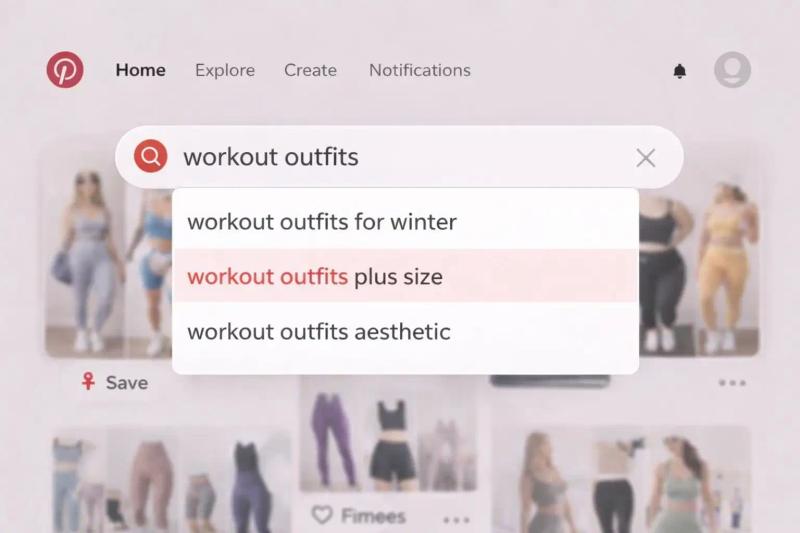
These phrases are real searches and valuable keywords.
Tip: Don’t over-stuff with keywords. Choose 2–3 natural phrases that match search intent and sprinkle them into your title and description.
2. Optimize Your Pinterest Profile
Your profile is one of the first things Pinterest looks at to understand your content focus.
To optimize your profile:
- Use a descriptive profile name that includes relevant keywords (for example, “PinSumo AI | Pinterest Marketing Automation” instead of just a name "PinSumo").
- Write a clear bio that describes what your content is about.
- Link your website and verify it if possible.
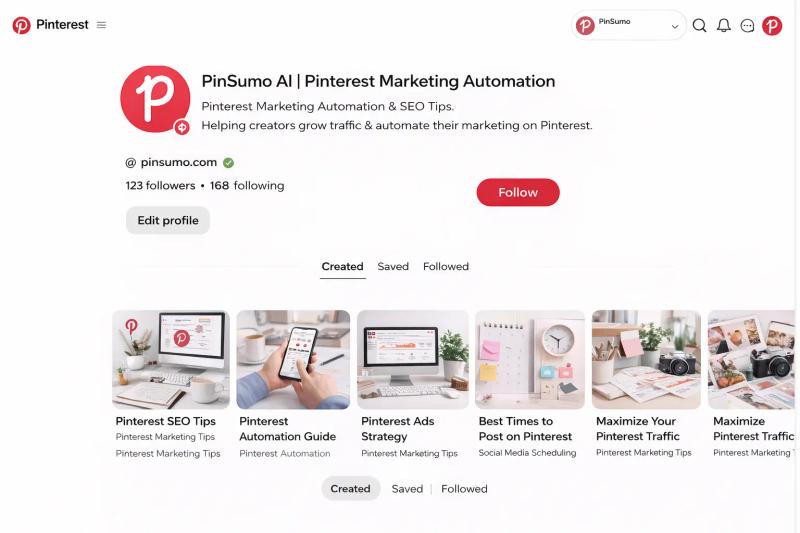
When Pinterest understands your niche, it can serve your content to the right audience.
3. Optimize Board Titles and Descriptions
Boards are essentially categories for your pins, and they play a big role in SEO.
Best practices for board optimization:
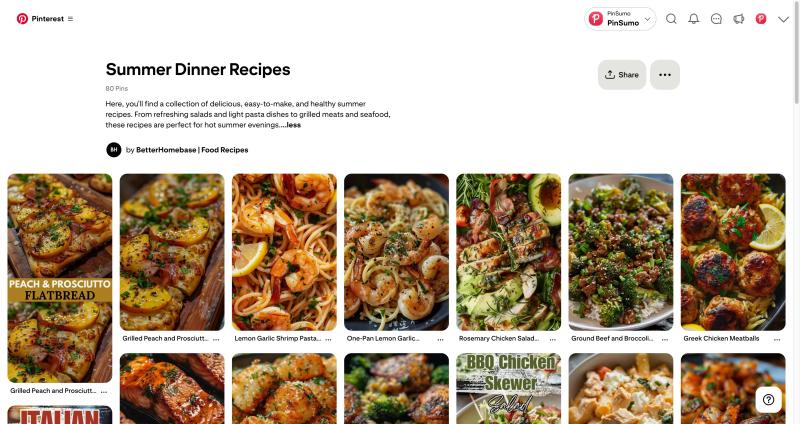
- Give boards specific names that describe the topic clearly (for example, “Small Kitchen Organization Ideas” instead of “Kitchen Stuff”).
- Add a descriptive board description with a relevant phrase or two.
- Avoid overly creative board names that are cute but unclear.
Why this matters: Pinterest indexes board information when matching content to search queries.
If you are just getting started, here is a step-by-step guide on how to create a Pinterest board
4. Write Smart Pin Titles and Descriptions
Your Pin title is a major ranking signal.
When writing titles:
- Be descriptive and keyword rich
- Keep it natural and useful
- Aim for clarity over creativity
Good example: “Easy Fall Dinner Ideas for Busy Weeknights”
Bad example: “Dinner Inspiration”
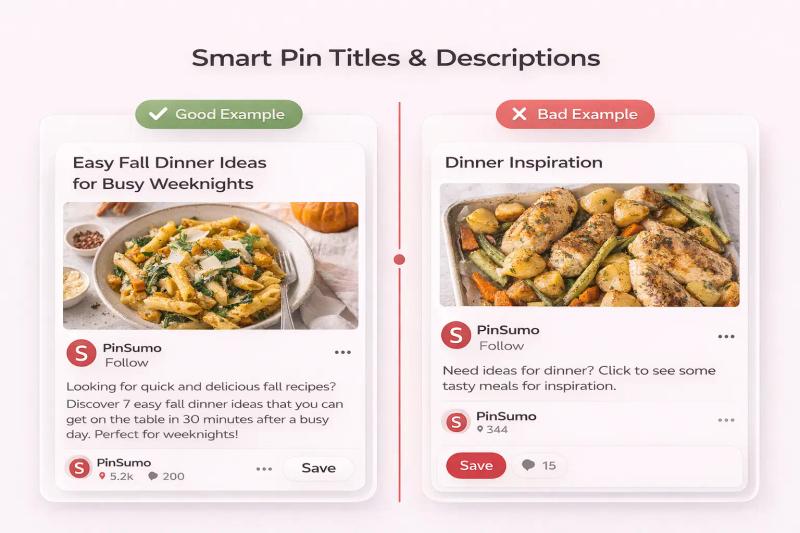
In descriptions, expand on what the Pin offers. Explain what someone will find when they click. Use search phrases naturally, but don’t cram them in repeatedly.
5. Use High-Quality Visuals
Pinterest is visual above all else. Great images get engagement, and engagement signals indicate relevance to the algorithm.
Tips for Pinterest visuals:
- Use vertical Pins with a 2:3 aspect ratio (e.g., 1000 x 1500 pixels).
- Include a text overlay that summarises what the Pin is about.
- Choose clear, vibrant colors that stand out in the feed.
More engagement often leads to better SEO performance because Pinterest sees that real people are interacting with your content.
6. Be Consistent With Posting
Pinterest rewards active accounts.
You do not need to post 50 pins a day. But you do need consistency.
This is where automation and systems become important.
If you are manually designing and scheduling every single pin, it becomes hard to stay consistent.
Tools like PinSumo AI help streamline this process. Instead of creating pins one by one, you can generate on brand pins automatically, keep visual consistency, and schedule them in advance.
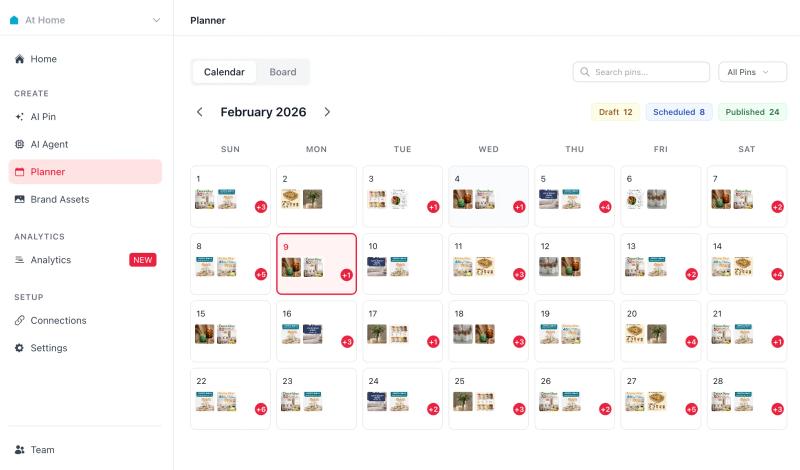
Consistency improves search visibility because Pinterest’s system sees ongoing activity.
When your posting rhythm is steady, your SEO efforts compound over time.
7: Create Fresh Pins for the Same Content
Pinterest values freshness.
If you have one blog post, do not create just one pin for it.
Create multiple visual variations.
For example:
Blog topic: How to Start a Small Balcony Garden
You could create:
- “Beginner Balcony Garden Ideas”
- “Small Balcony Garden Layout Tips”
- “Urban Balcony Gardening for Apartments”
Each one targets slightly different search phrases.
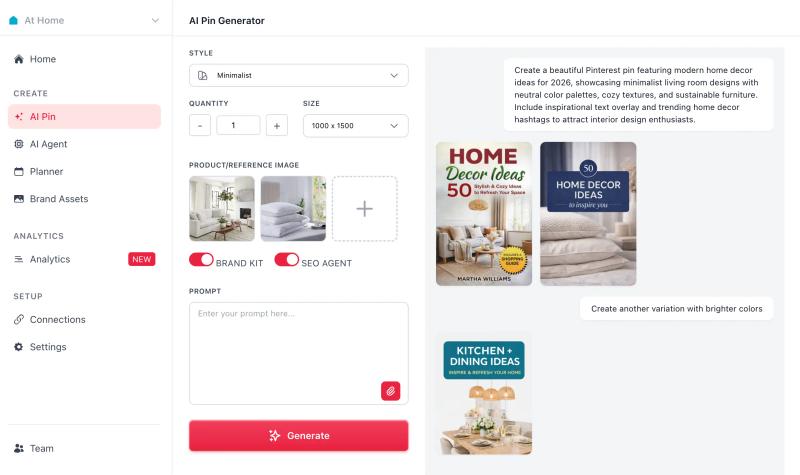
Using a structured workflow makes this easier.
Instead of redesigning manually each time, tools like PinSumo AI allow you to create multiple variations aligned with your brand style, which supports broader keyword coverage.
Why Pinterest SEO Is Different From Google SEO
Google SEO focuses on backlinks, domain authority, and technical optimization.
Pinterest SEO focuses on:
- Keyword relevance
- Visual clarity
- Engagement
- Account consistency
Pinterest is simpler in some ways. It rewards clarity and value.
Because Pinterest content has a long shelf life, optimization today can pay off for months.


Generate pins with AI agent on autopilot
Create, schedule, and grow your Pinterest presence effortlessly with AI-powered automation.
Try GenSumo FreeFinal Thoughts
Pinterest search optimization is not complicated.
It requires clarity, structure, and consistency.
If you treat Pinterest like a visual search engine instead of just another social platform, your strategy changes.
Use clear keywords. Organize boards properly. Create strong visuals. Post consistently.
And if scaling content feels overwhelming, building a system that keeps your pins consistent and searchable, whether manually or through tools like PinSumo AI, makes the process sustainable.
Frequently Asked Questions About Pinterest SEO
How long does Pinterest SEO take to work?
Pinterest SEO is not instant.
Unlike platforms where posts disappear quickly, Pinterest content can take weeks or even months to gain traction. The upside is that once a pin ranks, it can continue driving traffic for a long time.
Consistency and fresh content help speed up the process.
How do I find keywords for Pinterest SEO?
The easiest way is to use Pinterest’s own search bar.
Start typing a topic and look at the auto suggestions. Those suggestions are based on real user searches. You can also review related keyword bubbles that appear under search results.
Use those phrases naturally in your pin titles, descriptions, and board names.
Do hashtags help with Pinterest SEO?
Hashtags are not as important as they once were on Pinterest.
Pinterest now relies more on keywords in titles and descriptions rather than hashtag stacking. Using clear, natural language is far more effective than adding multiple hashtags.
How many pins should I post for good SEO?
There is no exact number.
What matters most is consistency. Posting regularly signals activity to Pinterest’s algorithm. Some accounts post daily, while others post a few times per week.
The key is maintaining a steady rhythm rather than posting in bursts and disappearing.
Does engagement affect Pinterest search ranking?
Yes.
Saves, clicks, and engagement signals indicate that users find your content useful. Pinterest’s system uses this data to determine which pins are more relevant for certain searches.
Strong visuals and clear messaging improve engagement, which supports SEO performance.
Should I create multiple pins for the same link?
Yes.
Pinterest values fresh content. Creating multiple visual variations for the same blog post or product allows you to target different keyword phrases and expand your reach.
This approach also increases the chances of ranking for multiple search terms.
Is Pinterest SEO different from Google SEO?
Yes.
Google SEO focuses heavily on backlinks and website authority. Pinterest SEO focuses more on keyword relevance, visual clarity, and engagement within the platform.
Both can work together, but the optimization strategies are different.
Can automation tools hurt Pinterest SEO?
Automation itself does not hurt SEO if used responsibly.
The problem occurs when automation produces low quality or repetitive content. Tools that help maintain visual consistency, generate keyword aligned pins, and schedule content thoughtfully can actually support Pinterest SEO by improving consistency and coverage.
