





There are moments when words are not enough.
You see a beautiful living room on a blog and want to find that exact sofa. You come across an outfit on social media and want similar styles. Or maybe you saved an image months ago and now want more ideas that look just like it.
Typing keywords sometimes feels limiting. That is where Pinterest image search becomes incredibly useful.
Instead of describing what you see, you can let Pinterest analyze the image itself and show you visually similar results.
In this guide, we will walk through how Pinterest image search works, how to use Pinterest reverse image search on mobile and desktop, and how to get the most accurate results.
Pinterest image search lets you find ideas using photos instead of keywords.
- Tap the camera icon in the search bar to upload or scan an image.
- Use the visual search tool inside any pin to zoom into specific items.
- Works best with clear, focused images.
- Results show visually similar pins, not always exact matches.
- Your image searches are private and not visible to others.
If you can see it, you can search for it on Pinterest.
What Is Pinterest Image Search?

Pinterest is built around visual discovery. Unlike traditional search engines that rely mostly on text, Pinterest allows you to search using images.
This feature is often called Pinterest Lens or visual search.
Rather than typing a phrase into the search bar, you can upload a photo or focus on a specific part of an image. Pinterest then scans the visual elements such as colors, shapes, patterns, and objects and returns similar pins.
It is especially helpful for:
- Home decor inspiration
- Fashion and outfit ideas
- Beauty looks
- Recipes
- Art and design
- Product discovery
If you can see it, you can search for it.
How to Image Search on Pinterest Using the Mobile App
Most people use Pinterest on their phones, so let’s start there.
Method 1: Use the Camera Icon in the Search Bar
1. Open the Pinterest app.
2. Tap the search icon at the bottom of the screen.
3. Inside the search bar, tap the small camera icon.
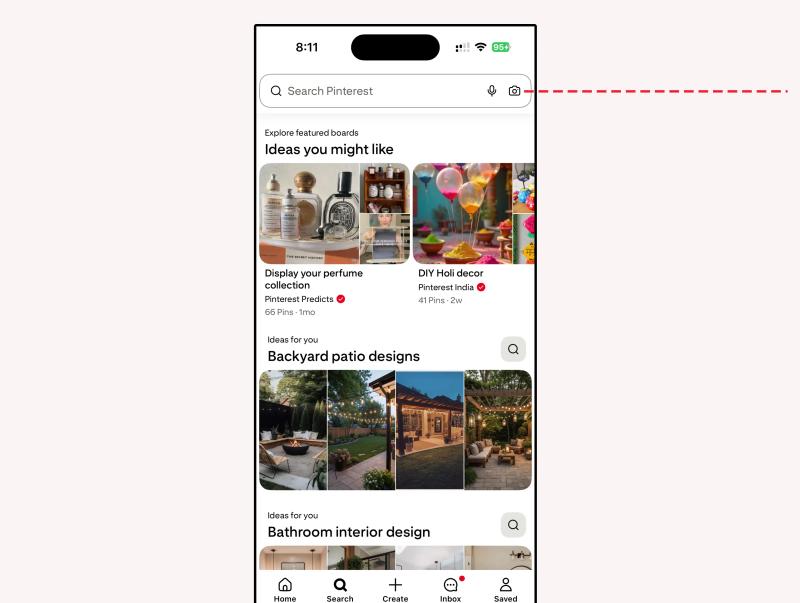
4. Choose to take a photo or upload one from your gallery.
5. Pinterest will scan the image and display similar results.
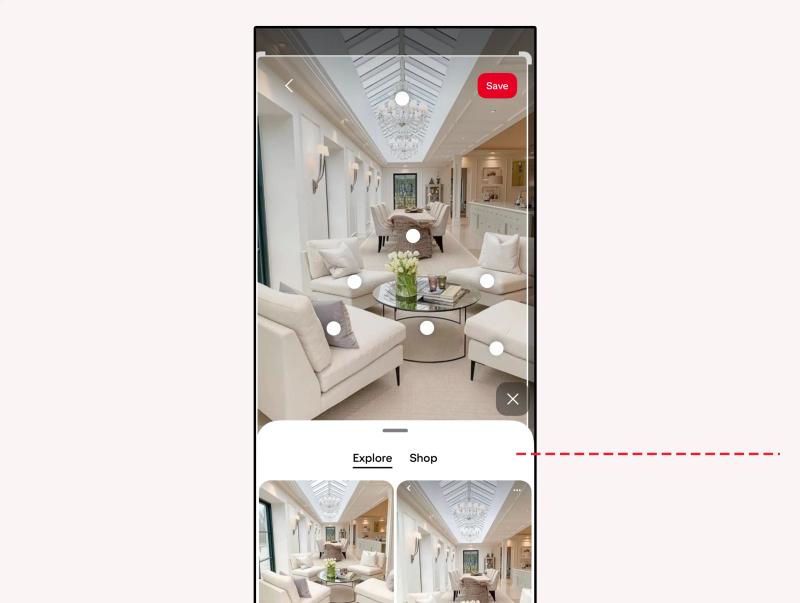
The results usually appear quickly. You will see pins that match the overall look and feel of your image.
This works best when the object is clearly visible and centered.
Method 2: Search Within an Existing Pin
Sometimes you like just one item inside a larger image.
For example, you may love the chair in a living room photo but not the entire room.
Here is how to search within a pin:
1. Open any pin.
2. Tap the magnifying glass or visual search icon on the image.
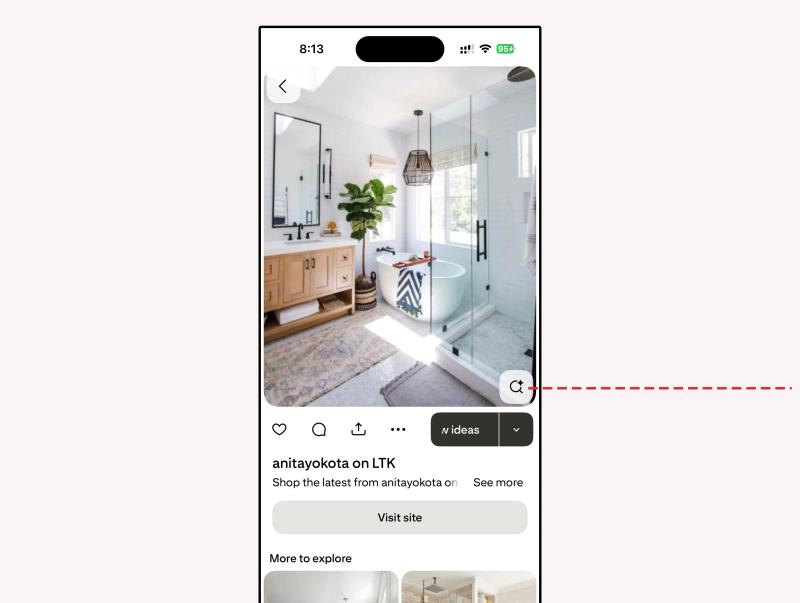
3. Adjust the selection box around the object you want to search.
4. Pinterest will show visually similar items based on that selection.
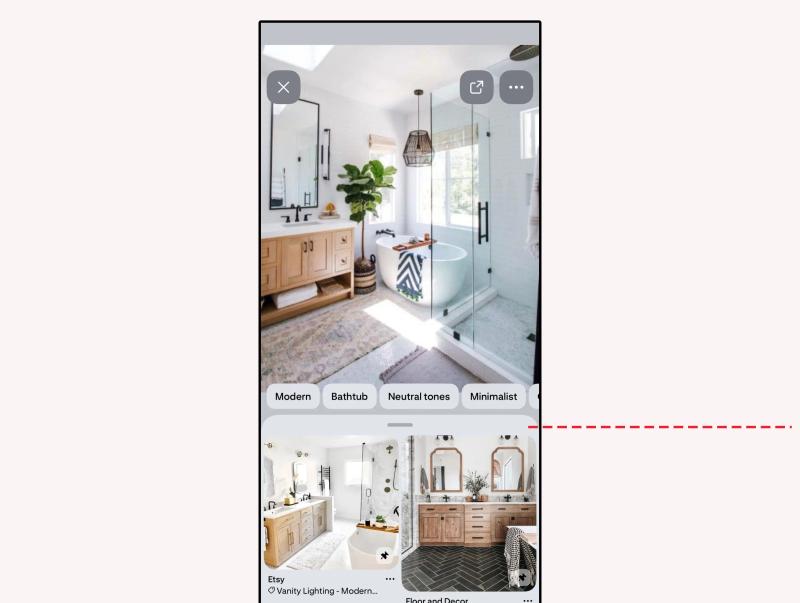
This feature is surprisingly useful for fashion, furniture, and accessories.
When Does Pinterest Reverse Image Search Work Best?
Pinterest image search is visual. That means clarity matters.
You will get better results when:
- The image is high quality.
- The main object is clearly visible.
- The background is not too cluttered.
- Lighting is good.
If the photo is blurry or contains too many objects, the search results may be less accurate.
It also works better for visually distinct categories such as clothing, furniture, and decor rather than abstract ideas.


Generate pins with AI agent on autopilot
Create, schedule, and grow your Pinterest presence effortlessly with AI-powered automation.
Try GenSumo FreeIs Pinterest Image Search Accurate?
It is not perfect, but it is very practical.
Pinterest does not try to identify exact products in most cases. Instead, it focuses on visual similarity.
For example, if you upload a photo of a beige linen sofa, you may see other beige sofas, neutral living rooms, or Scandinavian style interiors. It recognizes patterns and style more than specific brand details.
If you want highly specific results, combining image search with keyword search often gives better outcomes.
Read More Resources
If you want to explore Pinterest beyond image search, these guides will help:
- Pinterest SEO Guide to Ranking Higher
- Pinterest Pin Size & Image Dimensions Guide
- What Are Impressions on Pinterest?
- How to Make Money on Pinterest
- Pinterest Marketing Strategies That Work
Can Pinterest Image Search Find the Original Source of a Photo?
This is a common misunderstanding.
Pinterest reverse image search is designed to find similar images, not necessarily the original creator of a photo.
If you upload an image that already exists on Pinterest, you may see multiple pins containing the same image. That does not always mean you have found the original source.
If your goal is to track image ownership, you may need additional tools beyond Pinterest.
Is Pinterest Image Search Private?
Yes.
When you upload an image or use the visual search feature, Pinterest does not notify anyone.
Other users cannot see that you searched using their image. There is no public log of your image searches.
It works quietly in the background, just like regular keyword search.
How Pinterest Image Search Helps With Shopping
Pinterest has gradually integrated more shopping features into its platform.
When you use image search for fashion or home decor, you may see:
- Similar products
- Shop links
- Brand listings
- Product suggestions
For many users, this makes Pinterest feel like a visual catalog. You see something you like, upload a photo, and explore related styles in seconds.
It feels more intuitive than trying to describe a product in words.
Final Thoughts
Pinterest image search changes the way you discover ideas.
Instead of guessing the right keyword, you can let the image speak for itself.
Whether you are redesigning a room, building a wardrobe, experimenting with makeup, or planning a creative project, Pinterest reverse image search makes inspiration easier to find.
It works best with clear images and specific objects. And while it is not designed to identify exact products or original sources, it is one of the most user friendly visual search tools available.
If you have never tried it, open the app and tap the camera icon. You may be surprised by how quickly it understands what you are looking for.
